
Data
Data & freshness
All fire service objects come from OpenStreetMap. OpenFireMap prepares them for fast loading and fetches new entries live.
Where the data comes from
Hydrants, water points, fire stations and defibrillators are added by the OpenStreetMap community, often by local firefighters. OpenFireMap displays this data but does not change it.
How OpenFireMap loads hydrants
Depending on the area, the map uses one of two ways:
- Prepared tiles: for Germany, Austria, Switzerland, Liechtenstein and Luxembourg plus 40 more European countries, OpenFireMap builds data tiles in advance from the OpenStreetMap country extracts (Geofabrik). They are hosted at Cloudflare and delivered through its cache. Your browser fetches only the few tiles the view needs.
- Overpass API: everywhere else, OpenFireMap queries a public Overpass server directly, for the visible area plus a margin around it.
What the Overpass API is
The Overpass API is a public service that queries OpenStreetMap data by feature and area, for example “all hydrants in this rectangle”. The servers are run by volunteers and organisations, and many applications share them.
How fast an answer comes depends on:
- the load on the server OpenFireMap is using,
- the size of the area and thus how long the query runs,
- waiting times and rejections when a server is overloaded or rate-limits requests.
OpenFireMap knows four Overpass servers and tries them in random order. If one does not answer or reports overload, the map pauses it briefly and asks the next. Areas you have loaded are kept in the local cache in your browser.
How current the data is
| Area | Base data | New and changed entries |
|---|---|---|
| Germany, Austria, Switzerland, Liechtenstein, Luxembourg | prepared tiles, usually rebuilt daily | requested from Overpass |
| 40 more European countries | prepared tiles, usually rebuilt weekly | requested from Overpass as long as the base data is at most 10 days old |
| rest of the world | state of the Overpass server | with every query |
After loading the prepared tiles, OpenFireMap asks in the background for everything that has changed in the view since the base data date and adds it to the map.
Why a new entry does not appear immediately
A change in OpenStreetMap does not show up in OpenFireMap at the same moment:
- Processing: the Overpass server must have taken in the change. If it reports data that is too old, OpenFireMap discards the answer and shows the base data.
- Caches: the map keeps the result of that request for a few minutes per area, and loaded areas also in the local cache.
- Outages: if Overpass is overloaded or unreachable, the base data stays until a later request succeeds. OpenFireMap cannot influence that.
So no fixed time can be promised. If you do not see your entry yet, reload the map after a while.
The “Data status & origin” window
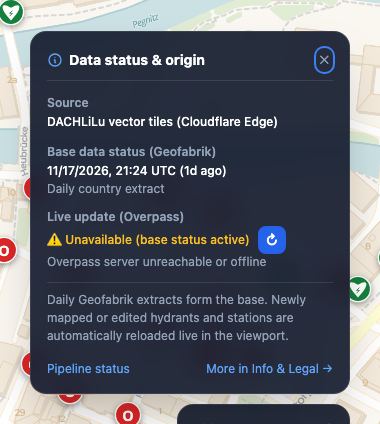
On a computer, open it with “Data status details” in the status box; on a smartphone, tap the status box.
- Source: prepared tiles (DACHLiLu or Europe), live query or local cache.
- Base data status: when the country extract was created. With several countries in view, the oldest date applies.
- Live update: whether newer changes have been loaded. “Not available” means the live service could not be reached and you see the base data. The button with the arrow tries again.
The status box shows the same in short form, for example “As of: 1d ago +Sync”.
The status page
The status page shows for every country how old the OpenStreetMap data is, when the map was last updated and how many hydrants, fire stations and defibrillators there are per inhabitant. It is available in German and English.
Local cache
To show areas you have visited faster, OpenFireMap stores loaded data in your browser. Set how long under Local Cache in “Info & Legal” (in the menu on a smartphone): off, 1 hour, 1 day, 3 days, 7 days (default) or 30 days.
The data stays on your device. The cache does not replace updates: areas from the cache are still checked against the current data when you open them.
Without internet
OpenFireMap is not an offline map. Areas from the cache stay visible for a while, but new areas and search need a connection. For operations without a network, a printed town plan or an export is the better choice.
When loading takes a while
Outside the prepared countries, everything comes through Overpass. If a server is busy, OpenFireMap automatically tries the next; the message at the bottom shows what is happening. If that does not help, zoom in a little so the query gets smaller, and try again shortly. If all servers report overload, the bottleneck is Overpass itself. Then the only option is to reload later.
Your question is not here? Write to us: info@openfiremap.org
All topics